





Three weeks into working from home, Sarah noticed something. Not the productivity boost (62% of remote employees report feeling more productive at home, and she was one of them). What she noticed was pain. A dull ache at the base of her neck that started around 2 PM every day.
Her setup looked fine. New desk. Good chair. Decent laptop. But her screen sat flat on the desk surface, about 6 inches too low, and she'd been tilting her head down to look at it for 8 hours a day. Forward-head posture is a leading contributor to neck tension during desk work, and Sarah had been doing it for 120+ hours without realizing it.
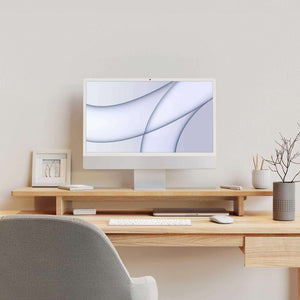
The fix wasn't a new desk or a chiropractor. It was a monitor stand for home office use, about 4.5 inches tall, that brought her screen up to where her eyes naturally wanted to look.
The Numbers Behind the Neck Pain
Sarah's problem wasn't unique. When your monitor sits on a flat desk, the center of the screen lands around chest height. Your head drops forward. Your neck muscles work overtime. After a few weeks, chronic tension sets in.

OSHA is specific about this: monitor center should sit 15 to 20 degrees below horizontal eye level, top of screen at or slightly below eye level, natural gaze angle 10 to 20 degrees downward, screen distance 20 to 40 inches from your eyes.
For most people, that means raising the monitor 4 to 6 inches off the desk. A home office monitor riser is just a platform that puts your screen where ergonomics says it should be. Correcting monitor height and distance reduces neck and shoulder discomfort by 20 to 30% within weeks. Working in a neutral position reduces stress on muscles, tendons, and your skeletal system. Sarah felt the difference in four days.

What Sarah Measured Before Buying
Before ordering a desk monitor stand, Sarah measured. She sat in her chair, marked eye level on the wall, and found a 5-inch gap between the desk surface and where her eyes landed. Her viewing distance was already fine at 22 inches. The height was the only problem.
Screen tilt matters too. OSHA recommends no more than 10 to 20 degrees. A good ergonomic monitor stand gets the height right so you don't need to crank the tilt to compensate.
The Glare Problem Nobody Mentions
Sarah's first instinct was a clear acrylic riser from Amazon. Then she noticed the reflection. Glossy plastic and glass stands bounce light from overhead fixtures and windows straight into your field of vision. You crank screen brightness to compensate, which causes more eye fatigue.
A wooden monitor stand for office use solves this quietly. Raw, unfinished premium-grade plywood has a matte, natural grain that diffuses light instead of reflecting it. No glare spots. No phantom reflections in your peripheral vision.
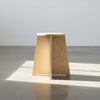
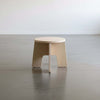
Our computer monitor stand is 13-ply premium-grade plywood, made in San Diego. The surface scatters light naturally, so your eyes deal with fewer competing light sources during a long workday. Especially useful if your home office has a window behind or beside you.
"Spent $200 on a glass riser that created a glare stripe across my desk every afternoon. Replaced it with an unfinished wood stand and the problem disappeared. Should have started there."
The Bonus: Reclaiming Desk Space
What surprised Sarah most about her desk monitor stand wasn't the neck relief. It was the shelf. Raising your monitor 4 to 5 inches creates usable storage underneath for notebooks, phones, speakers, and the cable tangle that used to eat up visible desk surface. Your desk feels bigger without being bigger.
And since our stand uses an interlocking joint system, there's no assembly involved. No tools, no hardware. You slide the pieces together and it's done. Under 2 minutes. Sarah set hers up between meetings.
Monitor Stand Buyer's Checklist
Measure your height gap. Sit normally, mark eye level on a wall, measure from desk surface to that mark. Your stand should put the top of your screen at or just below that line.
Check your viewing distance. Your screen should be 20 to 40 inches from your eyes. If it's too close, you may need a deeper desk before you need a riser.
Check the material. Glossy surfaces create glare. Matte, raw wood diffuses light. If your office has overhead lighting or a nearby window, this matters daily.
Confirm weight capacity. 13-ply premium-grade plywood handles monitors without flexing. Acrylic and thin bamboo can bow under heavier displays over time.
Think about underneath. The best desk monitor stand doubles as a shelf. If the underside isn't usable, you're wasting the space you just created.
Make It Yours
Since our monitor stand ships unfinished, you can paint, stain, or seal it to match your desk, your shelves, or nothing at all. Leave it raw and the premium-grade plywood grain adds warmth without looking like a craft project. If your setup changes, it disassembles as fast as it went together.
Check out the monitor stand, browse the full home office collection, or see what a monitor riser actually changes about a daily work setup.
FAQ
How high should a monitor stand be for a home office?
For most people, a riser between 4 and 6 inches tall puts the top of the screen at or slightly below eye level, with the center sitting 15 to 20 degrees below your horizontal line of sight. If you're tilting your head down to see the middle of the screen, the stand isn't tall enough.
Does an unfinished wood monitor stand need to be sealed?
No. Raw premium-grade plywood is smooth, stable, and structurally sound without any finish. Leaving it unfinished actually reduces glare since matte wood diffuses light. If you want water resistance, a single coat of matte polyurethane takes about 10 minutes.
Can a monitor stand really help with neck pain?
Yes. Correcting monitor height and viewing distance reduces neck and shoulder discomfort by 20 to 30% within a few weeks. The key is getting your screen to a height where your natural gaze angle (10 to 20 degrees downward) lands on the center of the display, which a properly sized stand accomplishes without replacing your desk or chair.
For a deeper look at why we chose premium-grade plywood over bamboo and particle board, read Why a Wood Monitor Stand Is Worth It.