You bought the printer. You cleared the desk. Then the filament spools went on the floor, the tools ended up stacked in a corner, and the whole setup started looking like a construction site. This guide is about solving the storage problem that comes after the printer, and how a dedicated table-with-storage setup eliminates most of the mess permanently.
Why storage is the real 3D printer problem
Most guides focus on finding a sturdy table. That is the right starting point: a wobbly surface creates vibration artifacts in prints and that problem is real. But the bigger daily friction is what happens around the printer. Filament spools absorbing moisture sitting open on a shelf. Spare nozzles lost in a drawer. Print beds stacked where they should not be. Tools spread across three surfaces because there is nowhere specific for them.
A 3D printer table with storage is not just about organization. It is about print quality. Filament stored at the right humidity produces better prints. Tools within reach reduce the time between print end and print start. A dedicated setup on a dedicated printer stand creates the conditions for consistent results.
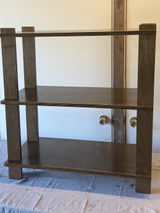
 Two modular shelf units side by side create a dedicated printer station with organized storage on each tier.
The four zones of a functional 3D printer table
Zone 1: The Print Surface
Top tier, clear and dedicated to the printer only. Nothing else lives here during an active print. Minimum surface area is 24 by 24 inches for most desktop printers, 30 by 24 inches if you run a larger bed or have a filament runout sensor mounted to the side.
Zone 2: Active Filament
One shelf below the printer, within arm's reach. This is where the currently loaded filament lives, in a dry box if you print with moisture-sensitive materials like PETG or TPU. One spool per dry box, clearly labeled with material and brand.
Zone 3: Filament Inventory
Lower shelves, organized by material type. Group PLA together, PETG together, specialty filaments together. Store in sealed bags or airtight containers with silica gel desiccants. Label each container with filament type, color, and date opened.
Zone 4: Tools and Consumables
A small bin or tray on a lower shelf for the tools you reach for after every print: spatula, flush cutters, needle-nose pliers, spare nozzles, bed adhesive, and isopropyl alcohol. Everything in one location, not scattered across three surfaces.
Filament storage: the details that actually matter
Most printing problems blamed on the printer are actually filament problems. Moisture-absorbed PLA becomes brittle and produces rough surfaces. Wet PETG strings badly. Wet nylon is nearly unprintable. The solution is storage that keeps filament dry at all times, not just when you remember to seal the bag.
"The best filament storage system is the one you will actually use. A sealed container with a desiccant pack beats an elaborate solution you set up once and never maintain."
 Shelf depth and spacing dimensions matter when configuring storage for filament containers and dry boxes. The modular shelf allows spacing adjustment between tiers.
What dimensions your printer table needs
Why it works
- A dedicated printer stand removes the printer from shared desk space, giving both the printer and your workspace room to function
- Multiple tiers distribute weight load across the structure rather than stacking everything on one surface
- Premium furniture-grade plywood does not flex or vibrate the way MDF or particleboard does under a running printer
- Tool-free assembly means you can reconfigure shelf spacing as your printer or storage needs change
What to know
- Budget at least 24 by 20 inches of clear surface for a standard desktop printer (Ender 3 class)
- Leave 8 inches of clearance above the printer for the extruder arm at max height
- Power strip should be shelf-mounted or wall-mounted, not on the floor where it can be kicked
- Vibration dampening pads under printer feet reduce noise transmission into the shelf structure
The shelf configuration that solves the storage problem
Two modular shelf units placed side by side give you the most flexible 3D printer storage setup without taking up excessive floor space. One unit holds the printer on top with tools and consumables on lower tiers. The adjacent unit holds filament inventory across its full height, organized by material type top to bottom.
The UNFNSHED printer stands are built from premium furniture-grade plywood. The shelf spacing is generous enough for tall filament dry boxes, and the solid plywood construction does not transfer vibration the way hollow-core or thin-panel shelving does. Assembly requires no tools and takes under 15 minutes.
 Three modular units create a full printer station: printer and active filament on one unit, inventory on the second, and a clean workspace or enclosure on the third.
3D printer table storage questions answered
How do you store 3D printer filament properly?
Store filament in sealed containers with silica gel desiccant at humidity below 15 percent RH. Standard 5-liter food containers hold one spool. Label each container with material type, brand, color, and date opened. For active printing, a dry box feeds filament from a sealed environment directly to the extruder without exposing the spool to ambient humidity.
What is the best table for a 3D printer?
A dedicated printer stand with multiple tiers is better than a standard desk for most setups. Look for a surface holding at least 24 by 20 inches for the printer, that does not flex under load, with lower shelves for filament storage. Solid plywood construction reduces vibration transmission compared to hollow-core or particleboard alternatives.
How much clearance does a 3D printer need above it?
Leave at least 8 inches of vertical clearance above the printer's tallest axis position to allow the extruder to reach maximum height without obstruction. For printers with top-mounted filament feeders or spool holders, add another 8 to 12 inches for the spool diameter.
Why are my 3D prints coming out rough or stringy?
Rough surfaces and excessive stringing are common symptoms of moisture-absorbed filament, not a printer problem. PLA absorbs moisture in 24 to 48 hours in humid environments when stored open. Dry your filament in a food dehydrator at 45 to 50 degrees C for 4 to 6 hours, then store in a sealed container with desiccant to prevent recurrence.